
How to prevent the sharing of digital files?
ℹ️ Info
Preventing the distribution of files is something you may be looking to do while using Big Digital Download. In this guide you will learn the multiple ways you can decrease the chance of file sharing.
⚠️ Warning
So important to realize that it's impossible to fully prevent the sharing of files. The methods above are intended to help you reduce the chance of sharing these files but it will not completely prevent it!
The multiple ways that you can achieve a reduction in file sharing using big digital download include:
- Method 1 (RECOMMENDED): Limiting the number of total downloads
- Method 2: Adding watermarks to PDFs (cannot be a password protected pdf)
- Method 3: Password protecting your Zip folders (or pdfs)

Method 1 : Limit the number of total downloads
On Big digital download you can limit the number of times someone can download there digital file.
Steps to limit how many times a digital product can be downloaded:
- In your Shopify admin dashboard look at the left hand panel and click on Apps.
- Click on Big Digital Download.
- Click click on Digital Products.
- Click Edit on the Digital product you want to change.
.png?alt=media&token=0e04e0d0-c86e-4b36-b2bb-e63dbc89e8e3)
- Click on Limit download per order and set the limit to your liking.
.png?alt=media&token=ab552d8b-ce22-4f6a-8379-641de0eefaa7)
- OR you can limit the download in time.
.png?alt=media&token=93503d44-e5e4-4bcd-8c73-e31320a1cc97)
⚠️ Warning
Important to realize that each click of the button is considered a download! This means we HIGHLY recommend to set this limit to 3 or higher to avoid issues with customers not being able to download after a single failed attempt.
✅ Success
Pros:
- Helps prevent excessive downloading of your digital product (which can drastically increase your bandwidth use if the files are massive)
- Helps prevent the spreading of the download link
🚨 Danger
Cons:
- Can restrict your customers from downloading once they reach a limit thereby causing them to contact you
→ My Customers See An Error Message "Maximum Limit Reached" How Do I Get Rid Of It?

Method 2: Adding watermarks to PDFs using Big Digital Download
Big Digital Download offers a stamping feature which will apply a watermark to your unprotected pdf files.
⚠️ Warning
Password protected PDF files cannot be stamped!
Steps to watermark your PDF using Big Digital Downloads stamping feature:
- In your Shopify admin dashboard look at the left hand panel and click on Apps.
- Click on Big Digital Download.
- Click click on Settings.
- In General settings scroll down till you see PDF stamping and set to Yes
PDF Stamping options on Big Digital Download explained
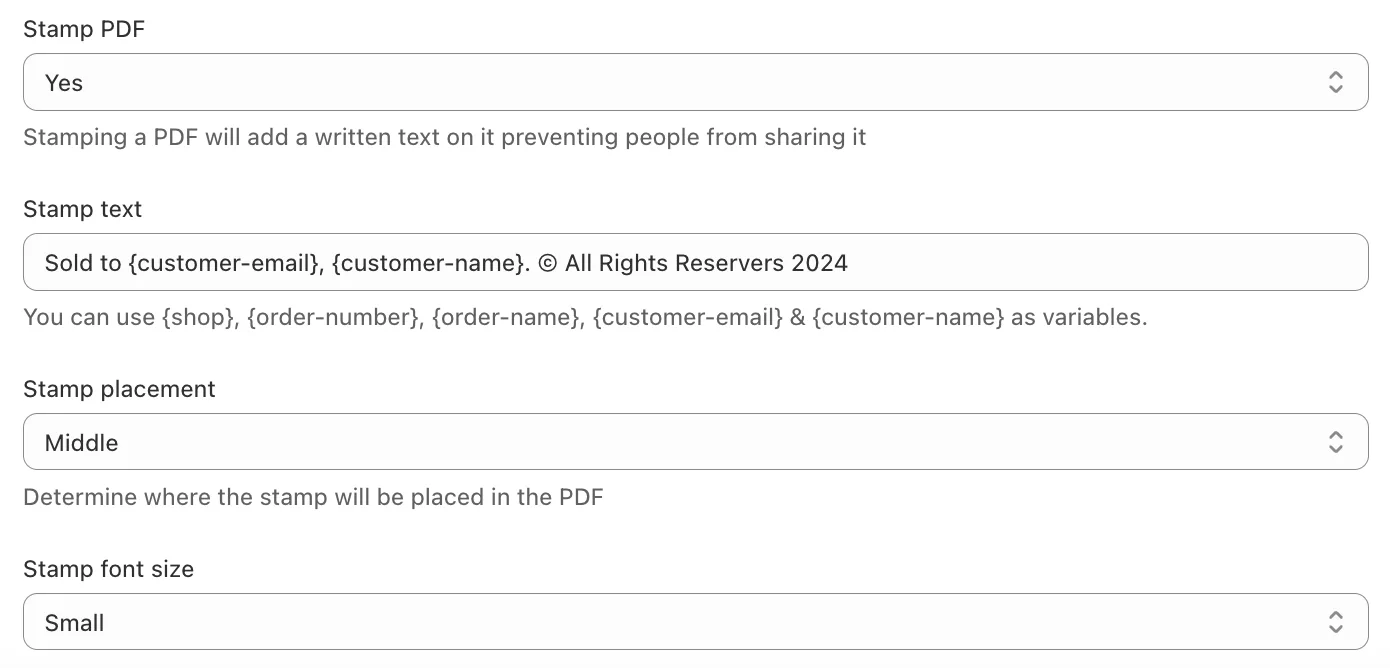
- Stamp text: You can use {shop}, {order-number}, {order-name}, {customer-email} & {customer-name} as variables.

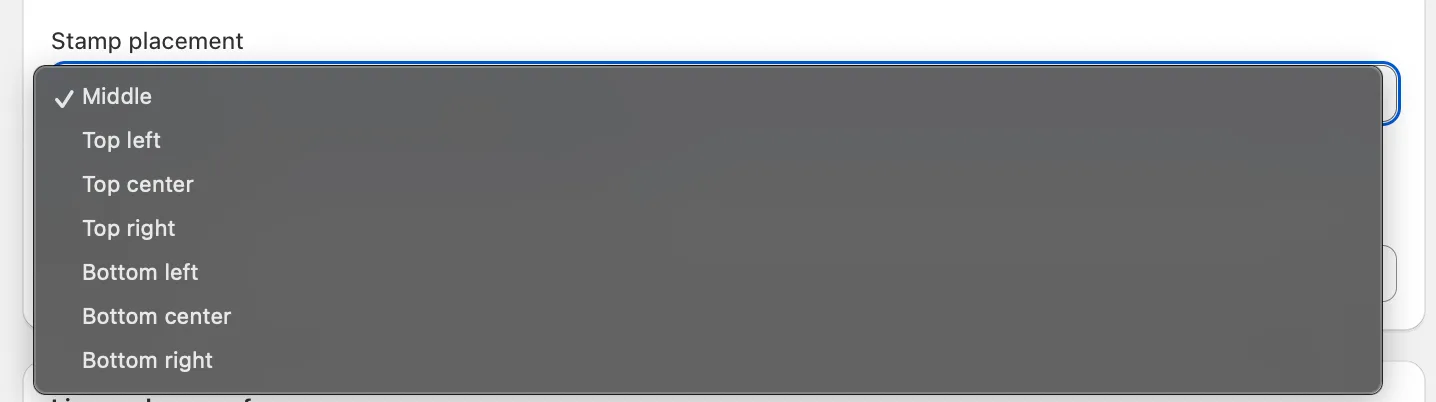
- Stamp Placement: Determines where the stamp will be placed
- Stamp Font Size: Determines how large the stamp will be
- Make sure to save before leaving!
✅ Success
Pros:
- Helps you track who's sharing your orders by stamping unique order details such as customer name and/or order number
We have gone over 3 possible ways of reducing the amount of sharing that takes place with your file. Remember that these are not ways of fully preventing the sharing!

Method 3: Add a password to your zipped folders :file_folder:
To add a password on your zipped folders you will need to use an external program like WinRar (Windows) or Macs built in compressor
Steps to add a password on your zip files using WinRar
- Install WinRar on your Windows.
https://www.geeksforgeeks.org/how-to-install-winrar-on-windows/
- Now you can upload your password protected zip to Big Digital Download.
✅ Success
Pros:
- Rar file are compatible across devices
- Offline protection
🚨 Danger
Cons:
- Requires the use of 3rd party software (WinRar on windows)
- Requires the unpacking of the Rar file on device of choice
- Each devices opens Rar files differently
- Rar passwords are static meaning they can be shared
⚠️ Warning
This password will be static meaning it can be shared! Consider Method 1 as an alternative if this is not okay with you.
Did this answer your question?